Setting a password on your iPhone backup is an effective method for protecting your private data. However, if your password is lost it can be a real problem. You can't restore your iPhone from iTunes backup file without this password. How to retrieve iPhone backup password then?
I will offer you several options in this article, which I'm sure will be of some help when you come across the iPhone backup password problem again.
Free DownloadPart One. Use a Software Tool to Retrieve iPhone Backup Password
This is the easiest and most efficient way to retrieve iPhone backup password. You could have my recommendation and follow this guide on how to retrieve iPhone Password – a pretty easy to use tool that enables forensic access to password-protected backups for iOS devices including iPhone 5, iPad, and iPod, which contain address books, call logs, SMS archives, voice mail and email account settings, applications. To use iPhone Password Retriever, you need only three simple steps.
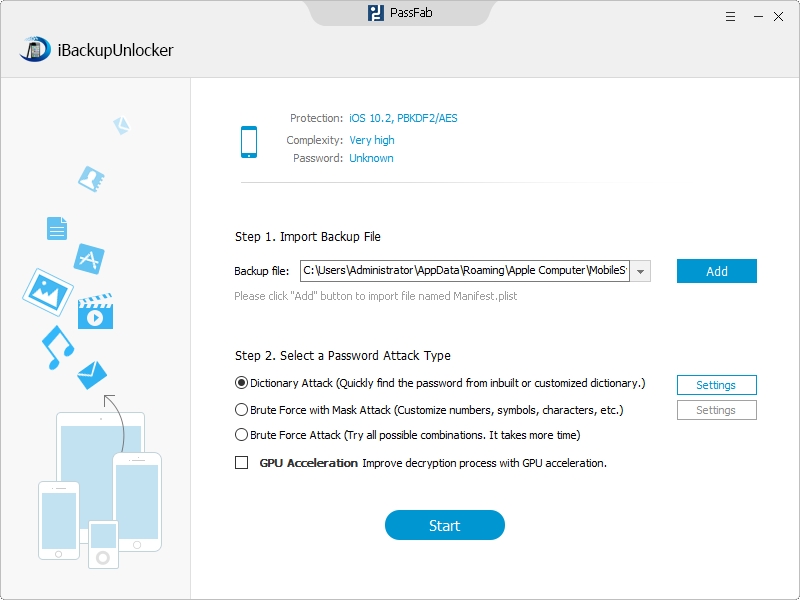
Step 1. Import iPhone Backup Key Container File
Press "Add" and the program will automatically detect and find directory of the key container file for you. You only need to click the file to finish the importing.
Step 2. Select an Attack Type and Define the Settings
- I. Before allowing the program to start finding your lost iPhone backup password, you need to select an attack type. You could see from the pictures below that the iPhone Backup Retriever offers three types of attack.

For example, if you want to use the Dictionary Attack, you should first choose it and then click "Setting" next to it.
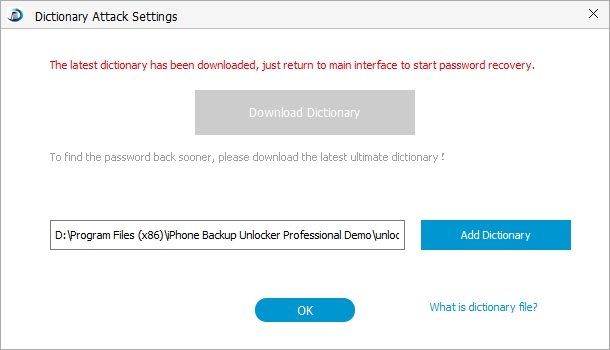
- II. After this you are required to set up a text file containing possible passwords, which will help to speed up the decryption process.
You may notice that there are two dictionaries in the pictures above. The first one is set by the program automatically, and the second one is for you to set.
Step 3. Click "Start" to Retrieve Lost iPhone Backup Password
You are just one step away from your password - click the "Start" button on the bottom of the interface to initiate the program.
Part Two. Other Options to Retrieve iPhone Backup Password
- Option 1: Try your iTunes Store password first. This may be the most commonly used password to restore your backup.
- Option 2: Try 0000 as the password, sometimes the default password is in fact, 0000.
- Option 3: If you are using Windows, the only thing left to try will be to change your iTunes password on your actual account to access the iTunes Store. Then on the backup password dialogue, try the old password and the newly set password.
With these options, retrieving lost iPhone backup password will no longer be a problem, and you could even share with your friends about how to retrieve an iPhone backup passcode.